
2021 Foreigner Work Permit Management System Upgrade: Authentication Process
In accordance with domestic "Internet + Government Services" construction requirements, the Ministry of Science and Technology (MOST) has established a unified identity authentication system to achieve "register once, recognized everywhere" and "authenticate once, access all services online." The Foreigner Work Permit Management System has been integrated into the MOST Government Service Platform.
From 2021 year, 01 month, 11 day onwards, government departments have upgraded the Foreigner Work Permit Management System. The new login portal is: https://fuwu.most.gov.cn/. The new system requires every legally established enterprise to re-complete the identity authentication for corporate users in the foreign-related system. To avoid any impact on business applications, please complete the authentication process as soon as possible.
How to Complete Real-Name Account Authentication and Login
Required Materials:
All materials below must be clear color scans or photos in JPG format:
-
Business License
-
Front and back copies of the ID cards of the legal representative and the company handler. If the legal representative or handler is a foreigner, provide the information page of their passport.
-
Company Information (e.g., address, company name, landline number, mobile number, email, etc.)
Steps: (Users previously registered in the old system only need to re-authenticate)
Step 1: Open the URL portal and select "Legal Representative Login." Log in using the username and password from your previous registration.
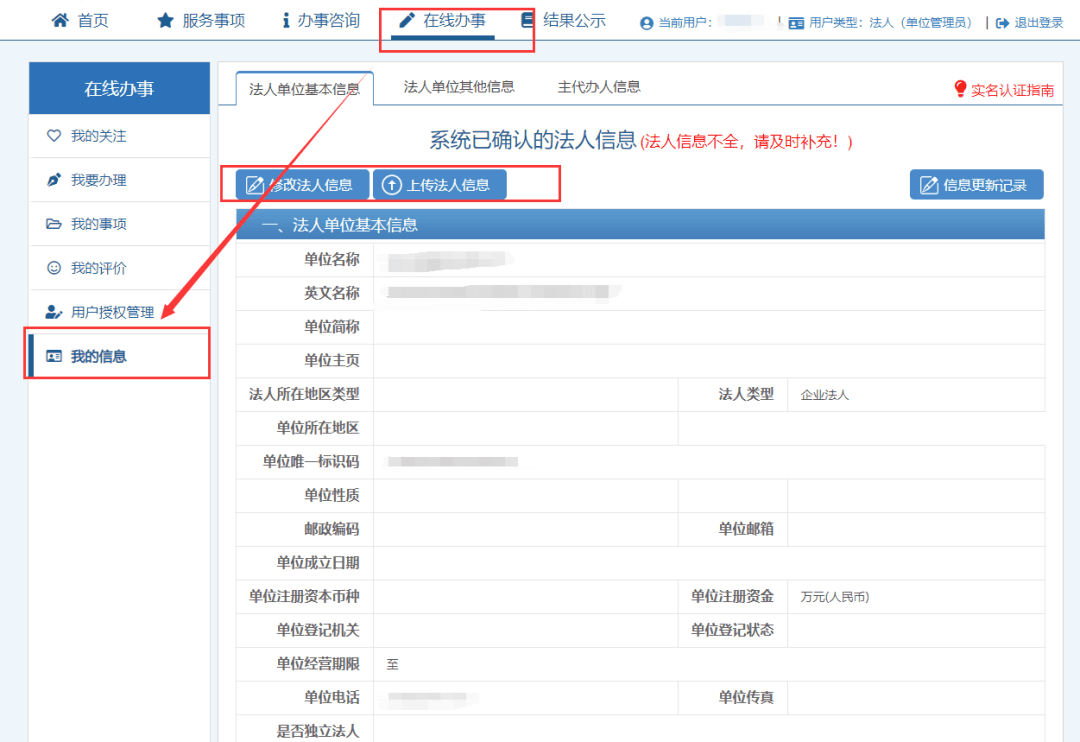
Step 2: Select "Online Services" → "My Information," then proceed to complete the relevant information and upload the required materials.
Step 3: After completing the form submission and material upload, and upon successful verification, log in again to return to the original system interface for business applications.
source: Huayang HUAYANG